
PropMatch: Property Matching
Property Matching
PropMatch is a state-of-the-art, property-based ontology matching system that aligns properties between OWL/RDF ontologies by comparing their labels, domains, and ranges. It employs an iterative refinement algorithm with confidence boosting and supports multiple preprocessing strategies to infer missing domain and range declarations. Unlike most ontology matching systems that focus primarily on class alignment, PropMatch specializes in identifying semantically equivalent properties across heterogeneous ontologies, addressing a critical and under-explored challenge in ontology alignment. PropMatch achieved top performance in the OAEI 2023 Conference Track, with 83% precision and 52% recall in the property-only matching modality (M2). The following diagram shows the architecture of PropMatch.
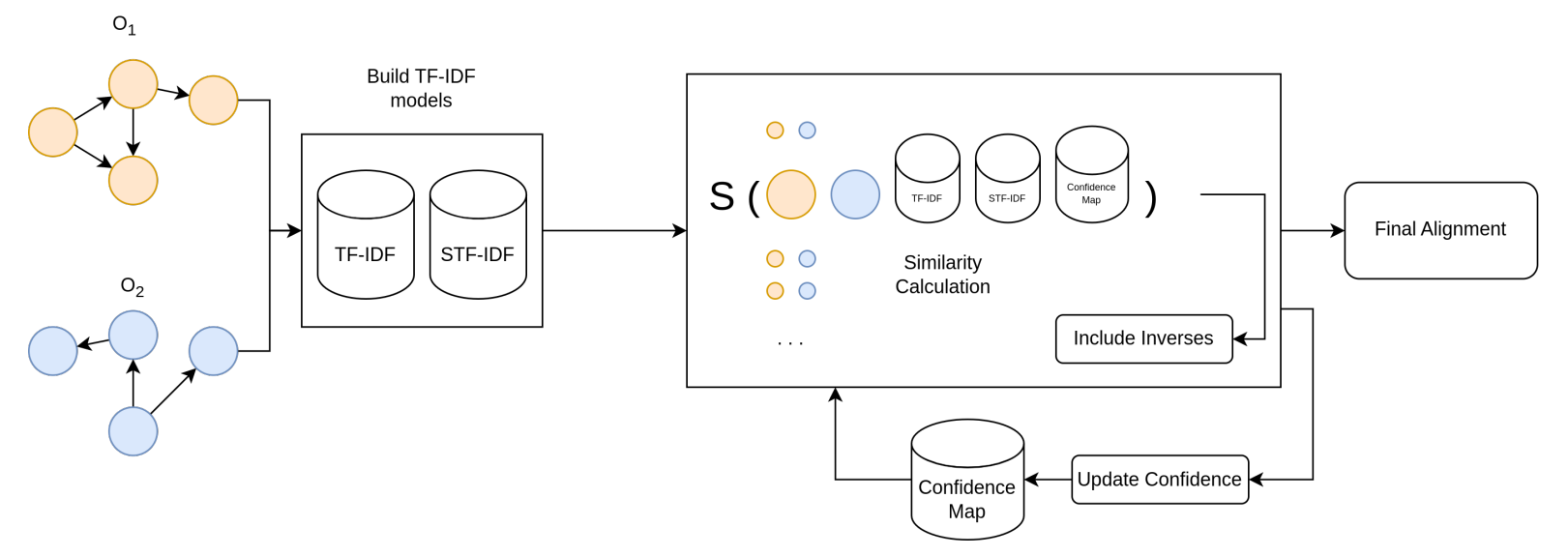
The PropMatch approach combines TF-IDF–based measures with word- and sentence-level embeddings to capture both lexical and semantic similarities between properties. It employs a multi-component matching strategy that evaluates label similarity using Soft TF-IDF with Jaro–Winkler metrics, analyzes domain similarity by comparing the types of entities associated with properties, assesses range similarity by examining the types of values properties can take, and incorporates contextual information through sentence transformers when structural similarity is high but label similarity is low.
Why Property Matching Matters? Property matching is fundamental to knowledge graph integration and semantic web applications. Properties define the relationships and attributes that connect entities in ontologies, and aligning them correctly is essential for: 1) Knowledge Graph Integration: Merging heterogeneous knowledge resources from different domains. 2) Data Interoperability: Enabling systems to understand and exchange data across organizational boundaries. 3) Semantic Search: Improving query answering across integrated knowledge bases. 4) Ontology Evolution: Tracking how properties change and relate across ontology versions.
Note
Reference-1: Sousa, Guilherme, Rinaldo Lima, and Cássia Trojahn. “Results of PropMatch in OAEI 2023.” In OM@ ISWC, pp. 178-183. 2023. https://ceur-ws.org/Vol-3591/oaei23_paper8.pdf
Reference-2: Sousa, Guilherme, Rinaldo Lima, and Cassia Trojahn. “Combining word and sentence embeddings with alignment extension for property matching.” In OM@ ISWC, pp. 91-96. 2023. https://ceur-ws.org/Vol-3591/om2023_STpaper6.pdf
Usage
This guide walks you through the complete PropMatch workflow for property-based ontology matching, from loading ontologies to generating and evaluating alignments.
Start by importing the necessary libraries and modules. These tools will help us process and align ontology properties.
# Core imports for property matching
from ontoaligner import ontology, encoder
from ontoaligner.aligner import PropMatchAligner
from ontoaligner.utils import metrics

# For exporting results
import json
Define the property alignment task using the PropertyOMDataset. You can choose different preprocessing strategies based on your ontologies’ characteristics.
Use this when your ontologies have explicit domain/range declarations.
task = ontology.PropertyOMDataset(
    processing_strategy=ontology.ProcessingStrategy.NONE
)

print("Task:", task)
Infers domain/range from the most frequent (subject_type, object_type) pairs.
task = ontology.PropertyOMDataset(
    processing_strategy=ontology.ProcessingStrategy.MOST_COMMON_PAIRS
)
Advanced inference considering type hierarchies for more sophisticated matching.
task = ontology.PropertyOMDataset(
    processing_strategy=ontology.ProcessingStrategy.MOST_COMMON_DOMAIN_RANGE
)
Now collect the dataset:
dataset = task.collect(
    source_ontology_path="path/to/source.xml",
    target_ontology_path="path/to/target.xml",
    reference_matching_path="path/to/reference.xml"  # Optional
)

print(f"Source properties: {len(dataset['source'])}")
print(f"Target properties: {len(dataset['target'])}")
Note
Preprocessing Strategies Explained:
NONE: Uses only explicit rdfs:domain and rdfs:range declarations. Fastest option.
MOST_COMMON_PAIRS: Infers missing domain/range by analyzing actual property usage patterns.
MOST_COMMON_DOMAIN_RANGE: Considers type hierarchies for more comprehensive inference.
Transform the parsed property data into a format suitable for the PropMatch aligner. The encoder reformats properties with their labels, domains, and ranges.
Uses only property labels for matching.
from ontoaligner.encoder import PropertyEncoder

encoder_model = PropertyEncoder()
source_onto, target_onto = encoder_model(
    source=dataset['source'],
    target=dataset['target']
)
Includes property labels, domains, ranges, and inverse properties.
from ontoaligner.encoder import PropMatchEncoder

encoder_model = PropMatchEncoder()
source_onto, target_onto = encoder_model(
    source=dataset['source'],
    target=dataset['target']
)
The encoder preprocesses the text (lowercase, remove underscores) and structures the data for optimal matching.
Hint
The 🏷️ Basic Encoder and 📊 PropMatch Encoder (Recommended) both are suitable for other aligners such as Retrieval, Leightweight, LLMs based alignment techniques. To use PropMatch Aligner technique please only use the dedicated encoder called PropMatchEncoder.
{
    "iri": "http://example.org#hasAuthor",
    "text": "has author  publication  person"
}
The text field contains: Property label (“has author”), domain (“publication”), and Range ( “person”).
{
    'iri': 'http://example.org#hasAuthor',
    'label': 'has author',
    'domain': ['http://example.org#Publication'],
    'domain_text': ['has author', 'publication'],
    'range': ['http://example.org#Person'],
    'range_text': ['has author', 'person'],
    'inverse_of': 'http://example.org#authorOf',
    'inverse_label': 'authorOf',
    'text': 'has author  publication  person'
}
Set up the PropMatchAligner with your desired configuration. The aligner uses TF-IDF models combined with word and sentence embeddings.
Basic configuration with balanced precision/recall:
aligner = PropMatchAligner(
    fmt='word2vec',      # Embedding format
    threshold=0.65,      # Minimum similarity for matches
    steps=2,             # Iterative refinement steps
    sim_weight=[0, 1, 2] # Use domain, label, and range
)
For applications requiring very confident matches:
aligner = PropMatchAligner(
    fmt='word2vec',      # Embedding format
    threshold=0.85,      # Higher confidence threshold
    steps=3,             # More refinement iterations
    sim_weight=[0, 1, 2],
    device='cuda'        # Use GPU if available
)
For finding more potential matches:
aligner = PropMatchAligner(
    fmt='word2vec',      # Embedding format
    threshold=0.50,      # Lower threshold
    steps=1,             # Faster processing
    sim_weight=[1]       # Label similarity only
)
When domain/range information is unreliable:
aligner = PropMatchAligner(
    fmt='word2vec',      # Embedding format
    threshold=0.70,
    disable_domain_range=True  # Ignore domain/range
)
Full control over all parameters:
aligner = PropMatchAligner(
    fmt='word2vec',           # Embedding format
    threshold=0.65,           # Similarity threshold
    steps=2,                  # Refinement iterations
    sim_weight=[0, 1, 2],     # Components to use
    disable_domain_range=False,
    device='cuda',            # CPU or CUDA
    lowercase=False
)
Hint
The PropMatchAligner supports the following embedding models:
Note
- Parameter Guide:
``fmt`: Either the embedding model is word2vec, glove, or fasttext.
threshold: Range [0.0, 1.0]. Higher = more precision, lower recall.steps: Number of refinement iterations. More steps may improve accuracy.sim_weight: [0]=domain, [1]=label, [2]=range. Use all three for best results.device: ‘cpu’ or ‘cuda’ for GPU acceleration.disable_domain_range: True (to ignore domain/range) or False (to use the domain/range).
Load the required word embedding and sentence transformer models for similarity computation.
aligner.load(
    wordembedding_path='GoogleNews-vectors-negative300.bin',
    sentence_transformer_id='sentence-transformers/all-MiniLM-L6-v2'
)
aligner.load(
    wordembedding_path='glove.6B/glove.6B.50d.txt',
    sentence_transformer_id='all-MiniLM-L12-v2'
)
aligner.load(
    wordembedding_path='path/to/custom_embeddings.bin',
    sentence_transformer_id='sentence-transformers/all-mpnet-base-v2'
)
Note
Model Selection:
Word Embeddings: Used for single-word domain/range similarity.
Sentence Transformers: Used for semantic label similarity fallback. The list of models are available at SentenceTransformers 🤗
Run the matching algorithm to generate property alignments between source and target ontologies.
matchings = aligner.generate(input_data=(source_onto, target_onto))

print(f"Generated {len(matchings)} property alignments")
The aligner will:
Build TF-IDF models from both ontologies
Calculate label similarity using Soft TF-IDF
Calculate domain and range similarity using TF-IDF
Apply confidence boosting for aligned classes
Perform iterative refinement over multiple steps
Return alignments above the threshold
The matchings list contains alignment dictionaries:
[
    {
        "source": "http://example.org/ont1#hasAuthor",
        "target": "http://example.org/ont2#writtenBy",
        "score": 0.87
    },
    {
        "source": "http://example.org/ont1#publishedIn",
        "target": "http://example.org/ont2#appearsIn",
        "score": 0.76
    },
    {
        "source": "http://example.org/ont1#hasTitle",
        "target": "http://example.org/ont2#title",
        "score": 0.95
    },
    ...
]
The similarity scores reflect confidence in the alignment:
0.90 - 1.00: Very high confidence (likely correct)
0.75 - 0.90: High confidence (generally reliable)
0.65 - 0.75: Medium confidence (may need review)
0.50 - 0.65: Low confidence (requires verification)
If you have reference alignments, evaluate the quality of your matches using precision, recall, and F1-score.
evaluation = metrics.evaluation_report(
    predicts=matchings,
    references=dataset['reference']
)

print("Evaluation Report:")
print(json.dumps(evaluation, indent=4))
Note
Tuning for Better Results:
If precision is low: - Increase threshold (e.g., 0.65 → 0.80) - Use all similarity components: sim_weight=[0, 1, 2] - Increase refinement steps
If recall is low: - Decrease threshold (e.g., 0.65 → 0.50) - Try preprocessing strategies - Consider label-only matching: sim_weight=[1]
Save your alignments in different formats for further analysis or integration with other systems.
Standard format for OAEI and many ontology tools:
from ontoaligner.utils import xmlify

xml_str = xmlify.xml_alignment_generator(matchings=matchings)

with open("property_alignments.xml", "w", encoding="utf-8") as f:
    f.write(xml_str)
Easy to read and process programmatically:
with open("property_alignments.json", "w", encoding="utf-8") as f:
    json.dump(matchings, f, indent=4, ensure_ascii=False)
For spreadsheet analysis:
import csv

with open("property_alignments.csv", "w", newline='', encoding="utf-8") as f:
    writer = csv.DictWriter(f, fieldnames=['source', 'target', 'score'])
    writer.writeheader()
    writer.writerows(matchings)
Save both alignments and evaluation metrics:
output = {
    "alignments": matchings,
    "evaluation": evaluation,
    "configuration": {
        "threshold": 0.65,
        "steps": 2,
        "sim_weight": [0, 1, 2]
    }
}

with open("complete_results.json", "w", encoding="utf-8") as f:
    json.dump(output, f, indent=4, ensure_ascii=False)
Advanced Usage
The following batch processing demonstrates how to process multiple ontology pairs in batch mode. It iterates over source–target ontology pairs, generates property alignments for each pair, evaluates the results against reference alignments, and aggregates precision and recall across all datasets.
ontology_pairs = [
    ("onto1_src.xml", "onto1_tgt.xml", "onto1_ref.xml"),
    ("onto2_src.xml", "onto2_tgt.xml", "onto2_ref.xml"),
    ("onto3_src.xml", "onto3_tgt.xml", "onto3_ref.xml"),
]
all_results = []
for src, tgt, ref in ontology_pairs:
    # Load dataset
    dataset = task.collect(
        source_ontology_path=src,
        target_ontology_path=tgt,
        reference_matching_path=ref
    )
    # Encode
    source_onto, target_onto = encoder_model(source=dataset['source'], target=dataset['target'])
    # Generate alignments
    matchings = aligner.generate(input_data=(source_onto, target_onto))
    # Evaluate
    evaluation = metrics.evaluation_report(predicts=matchings, references=dataset['reference'])
    all_results.append({
        'pair': (src, tgt),
        'matchings': matchings,
        'evaluation': evaluation
    })
# Aggregate results
avg_precision = sum(r['evaluation']['precision'] for r in all_results) / len(all_results)
avg_recall = sum(r['evaluation']['recall'] for r in all_results) / len(all_results)
print(f"Average Precision: {avg_precision:.3f}")
print(f"Average Recall: {avg_recall:.3f}")
The threshold sweeping can be applied using the following codes to identify an optimal alignment configuration. By evaluating PropMatch across a range of similarity thresholds, it compares precision, recall, and F1-score for each setting and selects the threshold that yields the best overall performance.
thresholds = [0.50, 0.55, 0.60, 0.65, 0.70, 0.75, 0.80]
results = []
for threshold in thresholds:
    aligner = PropMatchAligner(threshold=threshold, steps=2)
    aligner.load(
        wordembedding_path='path/to/word-embedding.bin',
        sentence_transformer_id='all-MiniLM-L12-v2'
    )
    matchings = aligner.generate(input_data=(source_onto, target_onto))
    evaluation = metrics.evaluation_report(predicts=matchings, references=dataset['reference'])
    results.append({
        'threshold': threshold,
        'precision': evaluation['precision'],
        'recall': evaluation['recall'],
        'f1_score': evaluation['f1_score']
    })

# Find best F1 threshold
best = max(results, key=lambda x: x['f1_score'])
print(f"Best threshold: {best['threshold']} (F1: {best['f1_score']:.3f})")
Different Aligners
The lightweight aligner provides a fast and efficient baseline for property matching using fuzzy string similarity. It relies on surface-level lexical similarity between property labels and is well suited for small to medium ontologies or scenarios where computational efficiency is critical. This aligner requires no pretrained models and offers a simple yet effective solution for quick experimentation and benchmarking. To use lightweight approach for property alignment, consider the following code:
import json
from ontoaligner import ontology, encoder
from ontoaligner.aligner import SimpleFuzzySMLightweight
from ontoaligner.utils import metrics

task = ontology.PropertyOMDataset(ontology.ProcessingStrategy.MOST_COMMON_PAIRS)
dataset = task.collect(
    source_ontology_path="assets/cmt-conference/source.xml",
    target_ontology_path="assets/cmt-conference/target.xml",
    reference_matching_path="assets/cmt-conference/reference.xml"
)

encoder_model = encoder.PropertyEncoder()
encoder_output = encoder_model(source=dataset['source'], target=dataset['target'])

aligner = SimpleFuzzySMLightweight(fuzzy_sm_threshold=0.8)
matchings = aligner.generate(input_data=encoder_output)

evaluation = metrics.evaluation_report(predicts=matchings, references=dataset['reference'])
print("Evaluation Report:", json.dumps(evaluation, indent=4))
Hint
Refer to the Aligners > Lightweight page for more information.
The retrieval-based aligner leverages sentence embeddings to perform semantic matching between properties. It encodes property descriptions using a pretrained SBERT model and retrieves the most similar candidates based on embedding similarity. This aligner is particularly effective for heterogeneous ontologies where lexical overlap is limited and deeper semantic understanding is required. To use retrieval approach for property alignment, consider the following code:
import json
from ontoaligner import ontology, encoder
from ontoaligner.aligner import SBERTRetrieval
from ontoaligner.postprocess import retriever_postprocessor
from ontoaligner.utils import metrics

task = ontology.PropertyOMDataset(ontology.ProcessingStrategy.MOST_COMMON_PAIRS)
dataset = task.collect(
    source_ontology_path="assets/cmt-conference/source.xml",
    target_ontology_path="assets/cmt-conference/target.xml",
    reference_matching_path="assets/cmt-conference/reference.xml"
)

encoder_model = encoder.PropertyEncoder()
encoder_output = encoder_model(source=dataset['source'], target=dataset['target'])

aligner = SBERTRetrieval(device='cpu', top_k=5)
aligner.load(path="all-MiniLM-L6-v2")

matchings = aligner.generate(input_data=encoder_output)
matchings = retriever_postprocessor(matchings)

evaluation = metrics.evaluation_report(predicts=matchings, references=dataset['reference'])
print("Evaluation Report:", json.dumps(evaluation, indent=4))
The RAG-based aligner combines retrieval and LLM reasoning to match properties across ontologies. A BERT-based retriever first selects the top-k most similar candidate pairs, and a lightweight LLM then checks whether each pair is a real match. A hybrid postprocessor combines retrieval similarity and LLM confidence to produce the final alignments. This approach works well for heterogeneous ontologies because retrieval finds plausible candidates while the LLM resolves ambiguous cases.
# Step1. Import Required Modules
import json
from ontoaligner.ontology import PropertyOMDataset
from ontoaligner.utils import metrics, xmlify
from ontoaligner.aligner import FalconLLMBERTRetrieverRAG
from ontoaligner.encoder import PropertyFullTextRAGEncoder
from ontoaligner.postprocess import rag_hybrid_postprocessor

#Step 2. Define the Task and Load Ontologies
task = PropertyOMDataset()
print("Property Matching Task:", task)

dataset = task.collect(
    source_ontology_path="../assets/MI-MatOnto/mi_ontology.xml",
    target_ontology_path="../assets/MI-MatOnto/matonto_ontology.xml",
    reference_matching_path="../assets/MI-MatOnto/property_matchings.xml",
)

# Step 3. Encode Ontologies
encoder_model = PropertyFullTextRAGEncoder()
encoded_ontology = encoder_model(source=dataset["source"], target=dataset["target"], reference=dataset["reference"])

#Step 4. Configure the Retriever and LLM
retriever_config = {"device": "cpu", "top_k": 5, "threshold": 0.1,
}
llm_config = {
    "device": "cpu", "max_length": 300, "max_new_tokens": 5, "device_map": "auto", "batch_size": 8,
    "answer_set": {
        "yes": ["yes", "correct", "true", "positive", "valid"],
        "no": ["no", "incorrect", "false", "negative", "invalid"],
    }
}

# Step 5. Generate Predictions
model = FalconLLMBERTRetrieverRAG(retriever_config=retriever_config, llm_config=llm_config)
model.load(llm_path="Qwen/Qwen2.5-0.5B-Instruct", ir_path="all-MiniLM-L6-v2",)
predicts = model.generate(input_data=encoded_ontology)

# Step 6. Postprocess Matches
# Heuristic Postprocessing
hybrid_matchings, hybrid_configs = rag_hybrid_postprocessor(predicts=predicts, ir_score_threshold=0.4, llm_confidence_th=0.5)
evaluation = metrics.evaluation_report(predicts=hybrid_matchings, references=dataset["reference"])
print("Property Hybrid Matching Evaluation Report:", json.dumps(evaluation, indent=4))
print("Property Hybrid Matching Obtained Configuration:", hybrid_configs)

# Step 7. Save Matchings in XML Format
xml_str = xmlify.xml_alignment_generator(matchings=hybrid_matchings)

output_file_path = "property_matchings.xml"
with open(output_file_path, "w", encoding="utf-8") as xml_file:
    xml_file.write(xml_str)
The LLM-based aligner uses a large language model to decide whether source-target property pairs are equivalent. Each pair is converted into a prompt with property details such as labels, domains, ranges, and inverses. The LLM’s free-form answer is mapped to a clean yes/no decision using a TF-IDF label mapper and logistic-regression classifier, and the postprocessor keeps the pairs marked “yes” as final alignments. This approach is flexible because it uses full property context, but it is more computationally expensive since all pairs are evaluated directly.
import json
from torch.utils.data import DataLoader
from tqdm import tqdm
from sklearn.linear_model import LogisticRegression
from ontoaligner.ontology import PropertyOMDataset
from ontoaligner.encoder import PropMatchEncoder
from ontoaligner.aligner import AutoModelDecoderLLM
from ontoaligner.aligner import PropertyFullTextLLMDataset
from ontoaligner.postprocess import TFIDFLabelMapper, llm_postprocessor
from ontoaligner.utils import metrics, xmlify

task = PropertyOMDataset()
print("Property Matching Task:", task)

dataset = task.collect(
    source_ontology_path="../assets/MI-MatOnto/mi_ontology.xml",
    target_ontology_path="../assets/MI-MatOnto/matonto_ontology.xml",
    reference_matching_path="../assets/MI-MatOnto/property_matchings.xml"
)

encoder_model = PropMatchEncoder()
source_onto, target_onto = encoder_model(source=dataset['source'], target=dataset['target'])

llm_dataset = PropertyFullTextLLMDataset(source_onto=source_onto, target_onto=target_onto)
print("Number of property pairs:", len(llm_dataset))

dataloader = DataLoader(llm_dataset, batch_size=128, shuffle=False, collate_fn=llm_dataset.collate_fn)

model = AutoModelDecoderLLM(device="cpu", max_length=300, max_new_tokens=10)
model.load(path="Qwen/Qwen2.5-0.5B-Instruct")

predictions = []
for batch in tqdm(dataloader):
    prompts = batch["prompts"]
    sequences = model.generate(prompts)
    predictions.extend(sequences)
print("Number of predictions:", len(predictions))

label_dict = {
    "yes": ["yes", "correct", "true", "positive", "valid"],
    "no": ["no", "incorrect", "false", "negative", "invalid"],
}
mapper = TFIDFLabelMapper(classifier=LogisticRegression(), ngram_range=(1, 1), label_dict=label_dict)

matchings = llm_postprocessor(predicts=predictions, mapper=mapper, dataset=llm_dataset)

evaluation = metrics.evaluation_report(predicts=matchings, references=dataset['reference'])
print("Property LLM Matching Evaluation Report:", json.dumps(evaluation, indent=4))

xml_str = xmlify.xml_alignment_generator(matchings=matchings)
xml_output_file = "property_llm_matchings.xml"
with open(xml_output_file, "w", encoding="utf-8") as xml_file:
    xml_file.write(xml_str)
print(f"Saved property LLM matchings XML to: {xml_output_file}")

json_output_file = "property_llm_matchings.json"
with open(json_output_file, "w", encoding="utf-8") as json_file:
    json.dump(matchings, json_file, indent=4, ensure_ascii=False)
print(f"Saved property LLM matchings JSON to: {json_output_file}")

.. hint::

        Refer to the `Aligners > Retrieval <https://ontoaligner.readthedocs.io/aligner/retriever.html>`_ page for more information.

::